The Distinctive Appeal of a Hand Drawing Floral Frame Collection
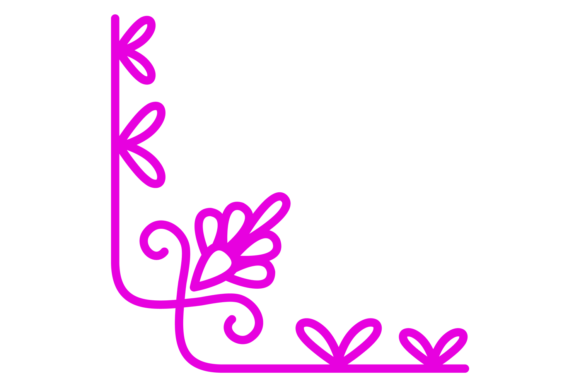
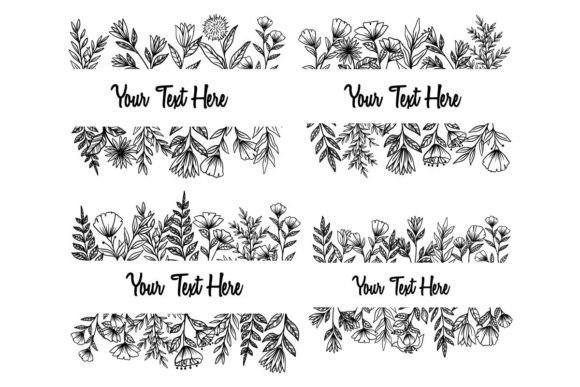
In the world of digital design, resources that bridge the organic charm of traditional artistry with the precision and scalability of modern tools hold a unique value. A Hand Drawing Floral Frame Collection represents this synthesis perfectly. Unlike geometrically precise or digitally generated vectors, this type of collection originates from physical sketches, capturing the nuanced line work, slight imperfections, and natural flow of an artist's hand. The final product, often offered as a set of 100 vector files, is digitized and refined, ready for integration into professional projects while retaining its original artistic character.
What Sets a Hand-Drawn Vector Collection Apart
The core distinction lies in the aesthetic. A Hand Drawing Floral Frame Collection offers a warmth and personality that can be difficult to achieve with purely software-driven tools. Each frame or floral element carries a sense of individual craftsmanship. This is particularly valuable for projects aiming to convey authenticity, elegance, or a bespoke feel—such as wedding invitations, boutique branding, artisanal product labels, or personalized stationery. The "hand drawing" aspect implies a human touch, a quality increasingly sought in a digitally saturated market.
From a technical perspective, the promise of compatibility with Adobe Illustrator, CorelDraw, or other vector software is crucial. Vector format means these designs are infinitely scalable without loss of quality, editable, and adaptable. The inclusion of multiple file types—.Ai, .EPS, and .JPG—addresses different workflow needs. The .Ai and .EPS files allow for full customization of colors, strokes, and composition, while the .JPG previews can serve as quick placeholders or references. The specification of color in RGB format indicates its primary suitability for digital and screen-based projects, which is an important consideration for designers focused on web graphics or digital publications.
Evaluating Fit: Strengths and Potential Tradeoffs
Understanding where this resource excels, and where its limitations might point you toward an alternative, is key to making an informed decision.
Primary Strengths and Best-Fit Situations
Aesthetic Uniqueness: The biggest strength is the pre-established artistic style. If your project vision aligns with soft, organic, illustrated borders rather than sharp, minimalist, or photographic frames, this collection can provide a coherent and ready-made visual language, saving significant illustration time.
Scalability and Flexibility: As vectors, every element can be resized from a business card to a billboard poster without issue. The editable nature means you can ungroup elements, change colors from the provided RGB palette, or combine individual florals to create entirely new frame compositions. This flexibility is a major advantage over static, raster-based floral images.
Workflow Efficiency: For designers proficient in vector software, having 100 pre-drawn elements can dramatically accelerate the production process. It eliminates the need to sketch, scan, and vectorize florals from scratch, offering a library of starting points.
Considerations and Limitations
Style Specificity: The collection commits to a particular hand-drawn style. If your project requires hyper-realistic botanical imagery, stark modern lines, or a different cultural aesthetic (like precise mandalas), this collection may not be the right fit, even though it is technically editable. The style is inherent.
Color Format Intent: The use of RGB color suggests a focus on digital use. For print projects requiring precise CMYK color matching, especially in commercial printing, you would need to convert the colors, which may cause slight shifts. This is a manageable tradeoff but requires awareness.
Customization Depth: While the vectors are editable, extensive modification to change the fundamental "hand-drawn" feel—for instance, making lines perfectly uniform—would defeat the purpose and likely be more work than creating new vectors from scratch. The collection is best used when you appreciate its core style.
Comparing Approaches: Using a Collection vs. Building from Scratch
A common point of evaluation for designers is whether to purchase a resource like this Hand Drawing Floral Frame Collection or to create all elements independently.
Building custom floral vectors from scratch offers total creative control. You dictate every curve, leaf shape, and color palette from the outset. This approach is essential for projects demanding a fully unique, trademarked aesthetic or for brands with an established, specific visual identity. However, the time investment is substantial. The process involves sketching, digitizing, refining vector paths, and ensuring consistency across a set.
Utilizing a professional collection, conversely, trades some foundational control for efficiency and artistic inspiration. You gain access to a cohesive set of 100 designs created by a skilled illustrator. Your creative effort shifts from creation to adaptation—how you select, combine, color, and integrate these frames into your unique layout. This approach is often more practical for time-sensitive projects, for designers who may not have strong illustration skills but possess excellent layout and composition skills, or for those seeking to inject a proven artistic style into their work without the uncertainty of starting from zero.
The decision often hinges on project constraints and skill distribution. A freelance designer handling multiple clients might find the collection a valuable asset library. An in-house designer at a company with a very rigid brand guide might need to create everything custom. There is no universally superior choice; it depends on the balance between time, budget, creative control, and the desired end aesthetic.
File Format Compatibility and Practical Application
The technical specifications of this Hand Drawing Floral Frame Collection directly impact its usability. Compatibility with major vector software like Adobe Illustrator and CorelDraw ensures it integrates into mainstream professional workflows. The .EPS file, particularly from Adobe Illustrator 10 version, offers broad compatibility with even older software or different vector platforms, enhancing its utility across diverse user environments.
In practice, how you use the files depends on your project phase. The .JPG files can be useful for early mockups or presentations to clients before committing to detailed vector editing. The .Ai and .EPS files become the workhorse formats for final design. A typical process might involve opening an .EPS frame in Illustrator, adjusting the RGB colors to match a client's brand palette, ungrouping the design to remove a specific flower element, and then incorporating the adjusted frame into a larger poster or invitation layout. The 100-file count provides variety, allowing you to choose simple frames for minimalist applications or more intricate, lavish borders for ceremonial designs.
When This Collection Is the Right Choice
- Your project requires an organic, elegant, or personal illustrated aesthetic.
- You are working under time constraints and need a starting point of high-quality, scalable art.
- You are comfortable working within vector software to adapt and customize pre-made elements.
- The primary output is digital (web, social media, digital magazines) or print where RGB-to-CMY conversion is manageable.
- You value having a library of resources for repeated use across different projects with a similar tonal quality.
When You Might Need Another Option
- Your project demands a floral style radically different from hand-drawn illustration (e.g., photographic, geometric, abstract).
- Complete, from-the-ground-up originality is a non-negotiable project requirement.
- Your print workflow requires guaranteed CMYK color accuracy from the source files without conversion.
- You need 3D elements, animated components, or raster-based textures that a flat vector collection cannot provide.
Ultimately, a Hand Drawing Floral Frame Collection is a specialized tool. It serves designers looking to incorporate proven, beautiful hand-crafted artistry into their digital workflow efficiently. Its value is not just in the 100 vectors provided, but in the artistic sensibility and time savings it embodies. By understanding its distinct style, technical parameters, and the tradeoffs compared to a fully custom approach, you can make a more confident, informed decision about whether it aligns with your specific project needs and design methodology.