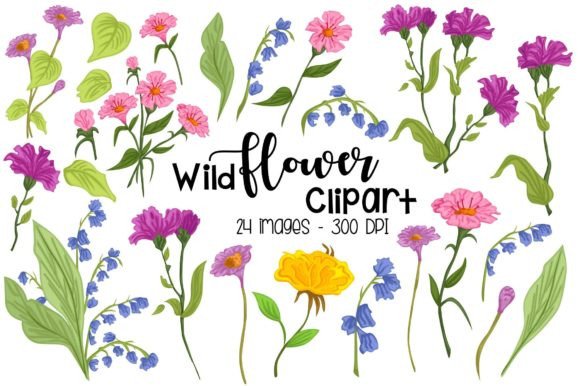
A Practical Guide to Using Wild Flower Clipart - Floral Clip Art
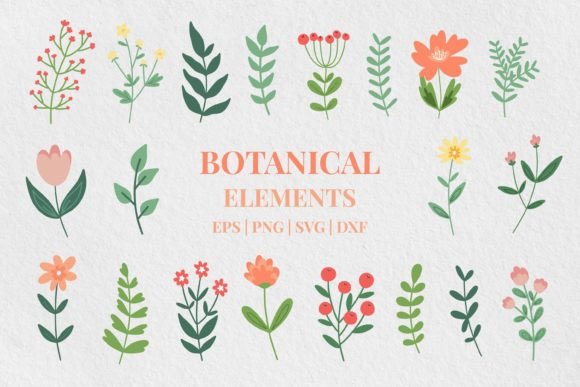
Imagine creating a custom birthday invitation that feels uniquely personal, or designing marketing materials for a local business that radiate a warm, organic charm. That’s the potential locked within a well-chosen digital clipart set. The specific collection, Wild Flower Clipart - Floral Clip Art, offers a versatile toolkit of 24 design elements, promising to streamline creative projects for a wide range of users—from hobbyists crafting a scrapbook page to entrepreneurs branding a new eco-friendly product.
The appeal is clear: instant, professional-looking botanical graphics without the need for illustration skills. However, the journey from downloading a file to achieving a polished final product has several common pitfalls. By understanding these overlooked details, you can ensure your investment in this digital asset translates directly into the quality and efficiency you expect.
The Critical Details Often Missed Before Purchase
Many creators focus solely on the visual style of the clipart—the pretty flowers—and overlook the technical specifications that dictate real-world usability. A set might look beautiful on a sales page, but if its technical foundation is weak, it will cause friction in your workflow.
First, consider the PNG format with a transparent background. This is a crucial feature for layering designs onto your own backgrounds. However, a common mistake is assuming all “transparent” PNGs are created equal. Low-resolution files or those with poorly cleaned edges (where leftover white pixels fringe the flower edges) will look amateurish when placed over a colored background. The mention of 300dpi high resolution and a 12-inch size in this set is a strong indicator of quality, meaning you can scale the images for large format prints like posters without losing sharpness.
Another frequently underestimated element is the inclusion of the one SVG file. For beginners, this might seem like an extra, technical file they ignore. In practice, the SVG (Scalable Vector Graphic) is immensely powerful. Unlike PNGs, which are raster images and can blur if enlarged beyond their intended size, the SVG is vector-based. This means you can resize it infinitely without any loss of quality, making it perfect for projects where you need a single flower icon to work on a business card and a large banner simultaneously. Not utilizing the SVG is a missed opportunity for flexibility.
Avoiding Application Mistakes That Diminish Your Work
After acquiring a set like Wild Flower Clipart - Floral Clip Art, the next missteps occur in application. A typical error is using the clipart elements as isolated, repetitive stickers. Placing the same sunflower graphic multiple times on a page, at the same size and rotation, makes a design feel template-like and cheap.
A better approach is to treat the clipart as a cohesive botanical library. Combine different elements from the set—a small bud, a leafy stem, a larger bloom—to build your own custom floral arrangements. Use the transparent background to layer a flower cluster over a textured paper image in your scrapbook. Adjust colors subtly within your design software (if the license permits) to create a monochromatic theme for a wedding invitation. This transforms pre-made assets into original compositions.
Furthermore, professionals sometimes forget to consider contextual appropriateness. Wildflower graphics convey a natural, rustic, or gentle aesthetic. Using this specific set for a high-tech corporate brochure would create a confusing visual message. Align the asset’s inherent style with your project’s tone. The wildflowers are perfect for greeting cards, garden center logos, spring party decorations, or educational materials about nature, but they are not a universal solution for all design needs.
The Licensing and Usage Oversight
Most users correctly understand that purchasing the clipart grants them a license for personal and commercial use. However, a nuanced point often missed is the distinction between using the artwork and redistributing the artwork file itself. You can create and sell a hundred greeting cards featuring these flowers. You cannot, however, bundle the original PNG files as part of a template you sell or give them away as a free resource on your blog. That constitutes redistribution of the digital product itself and typically violates the license. Always review the specific terms provided by the seller to protect your projects and respect the creator’s rights.
Ensuring Efficiency in Your Creative Workflow
Time is a valuable resource, and digital tools should save it. A common inefficiency arises from poor file organization. Upon downloading the 24 PNG files and the SVG, many users simply dump them into a generic “clipart” folder on their computer. Later, when needing a floral element, they waste time searching through dozens of unrelated files.
The practical corrective action is immediate organization. Create a dedicated folder named “Wildflower Set” and inside it, perhaps subfolders like “Full Flowers,” “Leaves & Buds,” and “SVG Assets.” Some designers even take a few minutes to create a simple preview sheet—a single document with all 24 images placed together—to serve as a visual catalog. This small upfront investment pays off in rapid retrieval during future projects, making the clipart set a true efficiency tool rather than a digital clutter.
Also, integrate the right file for the right task. Use the high-res PNGs for final print-ready outputs. Use the SVG file during the design and prototyping phase where you need to experiment with scale freely. This strategic use prevents the frustration of working with a pixelated image because you enlarged a PNG too much during layout.
What to Verify Before Your Final Decision
Before finalizing your decision to use Wild Flower Clipart - Floral Clip Art for a project, perform a quick checklist. Verify the project’s required output sizes: will you need elements larger than 12 inches? The PNGs at 300dpi should accommodate moderate scaling, but for very large prints, confirm the math or plan to use the SVG. Check the color mode of your project: if you’re designing for web only, RGB is fine; if for professional printing, ensure your software can handle the PNGs in CMYK mode without unexpected color shifts, though vibrant floral colors are generally robust.
Finally, assess the stylistic completeness of the set for your specific need. Do the 24 elements provide enough variety—different flower types, stems, perhaps a decorative border—to complete your vision without requiring you to source additional, stylistically mismatched graphics? A cohesive set saves time and maintains visual harmony. By paying attention to these practical aspects beyond the initial aesthetic appeal, you ensure that your floral clip art becomes a reliable, quality-enhancing component of your creative toolkit, delivering satisfaction from the first sketch to the final printed piece.